MASCHINE MIKRO MK3, MK3 and MASCHINE+ for Ableton Live 12
Hi, I'm Elton. I'm a producer, and I wanted my MASCHINE to feel in Live the way it feels in MASCHINE. So I've been building this script since 2021. v1 sold over 2,300 copies. This is v2, the biggest update so far.
You copy one folder, plug in your MASCHINE and start Live. That's it. No templates, no Controller Editor, no MIDI mode, nothing to install, no admin rights asked, nothing to set up in Live.
Windows 10 / 11 and macOS. Live 12.
What you get

MASCHINE's mixer, with moving meters
MASCHINE's mixer on the MK3's two screens: 8 tracks with their names in their colours, the meters moving with your set, volume, pan, mute and solo. On the MIKRO, tap VOLUME and your tracks glow on the pads with their levels.

A real controller, not a template
A real SHIFT for the second function on every button, as in MASCHINE. Your clips, tracks and drum pads in Live's colours. On the MK3, PATTERN shows 8 tracks' clips on the two screens, the way MASCHINE's Ideas view does, with their progress as they play.

Your devices on the controller
PLUG-IN shows the selected device's parameters by name, page by page. On the MK3 they are on the 8 knobs and the two screens, and Live's own devices get a picture that moves as you turn: EQ Eight's curve, Simpler's waveform, each Drum Synth's drawing.

Your MASCHINE Expansions in Live
Browse MASCHINE Kits on the controller, hear a preview as you turn, push to load it as a Drum Rack, pad for pad as in MASCHINE. No MASCHINE plug-in needed. Your MASCHINE favourites come along, starred.
Note repeat and an arpeggiator

Both follow pad pressure. Slide the touch strip for the rate. Hold a chord and the arp plays it. Its page shows the type as a picture, with the rates on the display buttons. Everything lands right on Live's grid when you record.
Chop a sample

Simpler in Slicing mode: the slices on the waveform, a cursor to add or remove a marker right where you want it, SLICE BY and SENSITIVITY on the knobs. The slices land on the pads, ready to play.
A chord on every pad
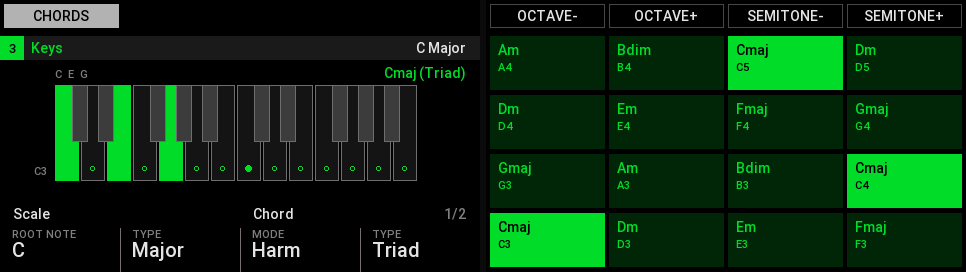
Every chord is in Live's key, from triads to 9ths, with voicings. The screens name the chord on each pad, and a chord you play lights up on the keys.
A step sequencer, read like MASCHINE

16 steps on the pads with the playhead running across them. Hold a step and turn for its velocity, its length or a nudge. The screens show the steps and every drum lane.
Browse by Live's tags
Live's browser on the two screens, filtered by Live's own tags on the knobs, the way MASCHINE's tag filters work. Turn through the results and hear each one.
Each Drum Synth on a card of its own

Live's Drum Synths each get a drawing. Hit the pad and the drawing plays the hit, as loud as you played it. Turn a knob and the drawing and its decay line follow the sound.
A Drum Rack in the mixer

On a Drum Rack track, 4-D down shows its pads as mixer strips, with hit meters. 4-D up: the tracks again.
KEYBOARD in your scale

The pads walk up Live's own scale, the root note bright. Change the root or the scale here and Live follows, and the other way round.
Your song on the screens


SHIFT + SCENE opens MASCHINE's Section page on Live's Arrangement: the song on the left screen, its sections between Live's locators. The locators are on the pads: hit one and the song jumps there on the beat.
VARIATION and EVENTS
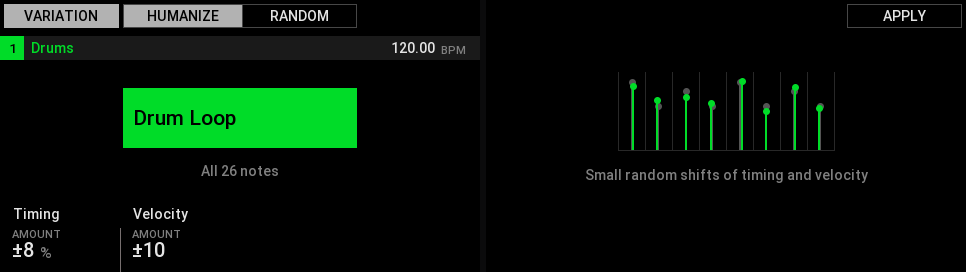
VARIATION makes a humanized or random copy of a clip right next to it, from any mode. EVENTS shows a clip's notes on the screens: select them with the pads, quantize or clear them.
Recording
Record exactly 1, 2, 4 or 8 bars, then the clip loops. A whole take undoes in one step.
Step undo
Take back a take's last note or chord, one at a time, and bring it back, as in MASCHINE.
Hot-Swap
Swap the selected device: the browser opens where your last swap of it left off, filters and all.
And more
Record automation from the knobs, LOCK to keep the controller on one track, the touch strip as a fader for any parameter. Keep the MASCHINE plug-in in your sets too.
Want to see all of it? The manual has every button, with the screens: Highlights and a guided Tour.
Two editions
MK3 for Live
- MASCHINE MK3, with its two screens and 8 knobs
- MASCHINE+ (Controller Mode, by USB)
- MASCHINE MIKRO MK3
What you need
- Ableton Live 12 (12.0 or newer: Intro, Standard or Suite).
- NI's MASCHINE software, installed (from Native Access). It brings the drivers. You don't have to open it.
- A MASCHINE MIKRO MK3, MK3 or MASCHINE+, connected by USB.
- Windows 10 / 11 or macOS.
Setup in 3 steps
- Copy the script's folder from the zip into Live's User Library.
- Plug in your MASCHINE by USB.
- Start Live and play. The controller asks for your licence key once.
The full guide, step by step for each controller and computer: Setup guide.
Licence, updates, support
- One key per purchase. Use it on up to 3 of your own computers. Move it to a new one any time.
- Works offline. It checks your key now and then, and keeps working for 90 days without internet.
- Free updates for all of v2.
- Bought v1? Thanks for the support :) You get 50% off v2. The coupon is in the email I sent you.
- Support: use the report form. I answer every message myself.
- Refunds: It's a digital product, so there are no refunds once a key is activated. If it doesn't run on your setup, write to me and I'll help you get it running.
FAQ
Do I need the MASCHINE software?
Yes, it needs to be installed. It brings the drivers your controller needs. You don't have to open it while you use Live.
Do I have to set anything up in Live?
No. Live finds the script by itself. No control surface to pick, no MIDI ports to set.
Can I keep the MASCHINE plug-in in my Live sets?
Yes. While Live runs, the controller stays with Live, and the pads still play the plug-in on its track. Or play your Expansions' kits without the plug-in: BROWSER > MASCHINE Kits.
Does it work with Live 11?
v2 is for Live 12. For Live 11 there is v1.6.1, my previous version.
Does it work with Live Intro or Standard?
Yes, any edition of Live 12.
I have a MASCHINE+. Does it work?
Yes, in Controller Mode by USB, the same way as the MK3. It is built from the MK3's protocol and has not been tested on a real MASCHINE+ yet. If something doesn't work, write to me and I'll sort it out.
Can I try it first?
There's no trial. But the manual has a guided Tour of every button and screen.
How many computers?
Up to 3 of your own with one key.